Individual
$30/year
- Unlimited named drafts on this device
- Resume any Smartsheet web form later
- Complex forms & conditional fields
Chrome extension
Mid-fill interruption shouldn't mean starting over. Save a named draft, restore when you're ready, and pick up exactly where you left off — including several versions of the same form.
Chrome Web Store listing coming soon. See pricing.
Local onlyDrafts stay in this browser — never sent to Archer or Smartsheet.
Reopen an in-progress form exactly where you paused.
Keep several versions of the same form — reload, edit, save again.
Conditional logic, checkboxes, remounting fields, Priority-style controls.
Local storage only · never exposes Smartsheet data for drafts
The restore moment
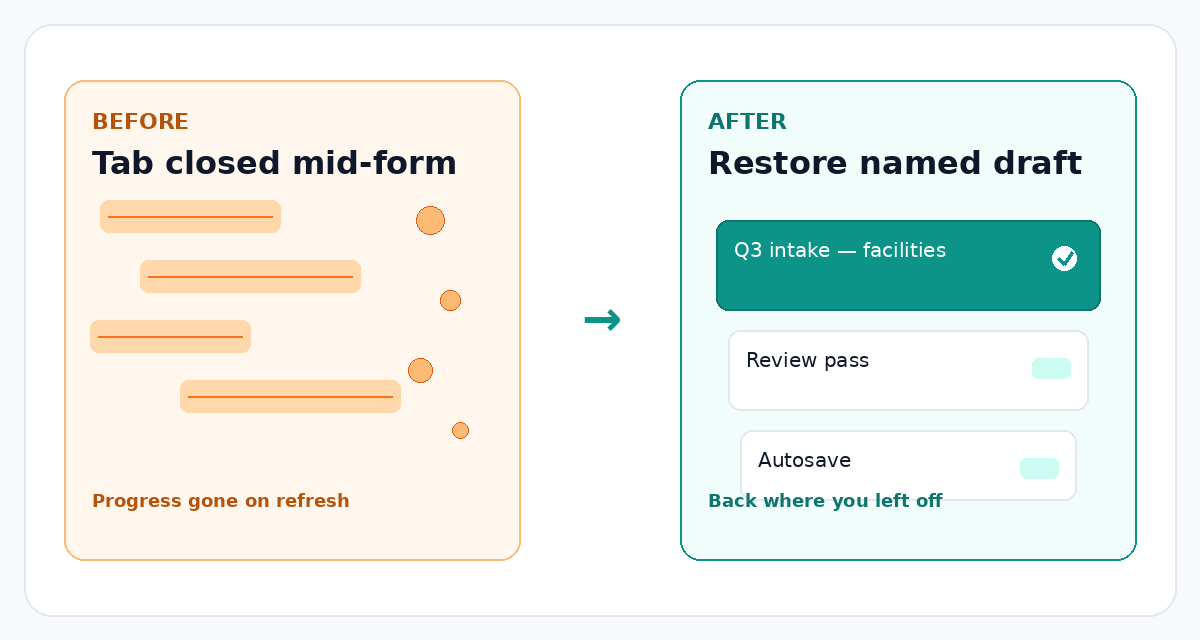
Long Smartsheet forms get interrupted — meetings, missing answers, a second version for review. SheetSaver lets you save named drafts, keep more than one in flight, and restore when you're ready to finish and submit.
How it works
Install from the Chrome Web Store when the listing is live — or start with pricing below.
Same public or shared form link you already use — nothing changes about how forms work.
Name the draft when you pause. Restore anytime — including a second named version of the same form — then submit as usual.
Pricing
Individual and Org checkout via Stripe. Enterprise is contact-only.
2 months free vs monthly
$30/year
Teams
$390/year
Custom
Technical details
If privacy or a federal/SLED checklist is on your plate, here's what SheetSaver does — and doesn't do.
Does not request broad host permissions. Doesn't pull sheets, workspaces, or attachments — only helps save and restore what you typed into an open web form.
Named drafts live in chrome.storage.local. Nothing syncs to Archer, Smartsheet, or a draft SaaS.
Close the tab, reboot, come back tomorrow — drafts remain on this computer. Content is not sent for backup, analytics, or “product improvement.”
Drafts never leave this browser. License checkout and key checks only prove you paid — that path never carries form answers, field values, or sheet contents.
Clear answers for hard review questions: Does draft content leave your device? No. New allowlists for answers? No. Vendor copy of in-progress answers? No.
We don't read your Smartsheet account, rewrite submitted rows, or move attachments. We don't require Smartsheet OAuth for drafts.
Need a security review packet? Contact Sam@archerct.com.
FAQ
Yes. Save a named draft while the form is open, then restore it later from the extension — fields refill so you can finish and submit as usual.
Yes. Give each version a name — for example a facilities draft and a review draft — then reload, edit, and save independently.
SheetSaver is built for real Smartsheet forms: checkboxes, remounting fields, Priority-style controls, and other conditional patterns that break naive autofill.
Drafts stay in this browser only, in chrome.storage.local. SheetSaver never uploads form answers, field values, or sheet contents — not to Archer, not to Smartsheet, not to a draft cloud. Anyone with access to that browser profile on that device can see them — same as other local browser data.
Two separate pipes. Drafts never leave this browser and never ride along with licensing. License only proves you paid: checkout → license key on the thank-you page → activate in the extension. That path may talk to our license check only — it never carries draft data, form answers, or sheet contents.
After checkout you get a license key on the thank-you page. Paste that key into the extension to activate. Click-to-activate from the thank-you page is planned later — today activation is paste-key only. Buying or checking a license never sends your drafts.
Yes for drafts after install. Once SheetSaver is installed, saving and restoring named drafts works offline — you only need the network to buy or activate a license. Opening a Smartsheet form itself still needs whatever connectivity Smartsheet requires.
No — not for drafts. There is no Smartsheet account login from the extension to save or restore form progress, and host_permissions is empty — no broad host-wide data access. Licensing is a separate path and does not use Smartsheet OAuth either.
No new allowlists for draft content. Form answers stay on the device; the extension does not send in-progress answers to Archer for storage, analytics, or training. If IT reviews outbound calls, the only SheetSaver-related network use is checkout / license activation — not drafts. Agencies still approve Chrome extensions on their own timeline — share the Technical details section with IT or privacy before rollout.
About Archer
SheetSaver is built by Archer Consulting Team, a Smartsheet Aligned partner. We help organizations get the most out of Smartsheet — from first license to full production — and we ship practical tools like this Chrome extension when a small workflow gap is holding teams back.
Extensions and custom tools are a tiny slice of what we do. Most of our work is hands-on consulting: licensing guidance, new implementations, support for solutions you already run, training, and custom builds on top of Smartsheet.
Want the bigger picture? Visit archerct.com or ask about a Smartsheet Health Check — a focused look at how you're using the platform today and where to go next.
Also from Archer
Present live portfolio sheets in the room — without another dashboard.
From our ENGAGE 2025 demo: SheetBot, Attachment Analyzer, Pathfinder, and Dashboard Snapshots.
Watch the ENGAGE 2025 demo
Restore named drafts, keep multiple versions, handle complex forms.
Chrome Web Store listing coming soon. See pricing.